Reflection Blog Post

My favorite project was the adobe premiere video story. This assignment was my favorite because I was the most familiar with Adobe premiere compared to the other programs. Another reason I enjoyed this project because it allowed me to make sense of my previous projects that were made with the other programs. The point of my topic was to tell a story and it felt like I was trying to tell the story backwards because the video was the most important part. The Photoshop and logo didn’t make sense until I was able to put it in my video story and explain what its purpose was. The skills I learned in this class were inspiring me to learn more about Photoshop. When we started the Photoshop assignment I began to grow frustrated because of my struggle learning the program at first. Even when we were done with Photoshop I still used the program to make funny photos and watched many YouTube tutorials to advance my knowledge on the program.

I would like to use some of these skills and apply them to advertisement within communications. I would really enjoy making Photoshop images and videos for company to promote a new product. In this course I wish I would have learned a little bit more about premier as in doing some of the advanced techniques. I understand that I had an advantage over some and I didn’t start at the beginning, but it still would have been nice to learn some advanced techniques. The resource for this class I found to be most helpful when learning the new programs was YouTube. There are so many videos on there that detail every aspect of these Adobe programs and it was very helpful. I really enjoyed this class and felt I learned so much from it. Thank you for all your time spent to make this an interactive and enjoyable online class.          
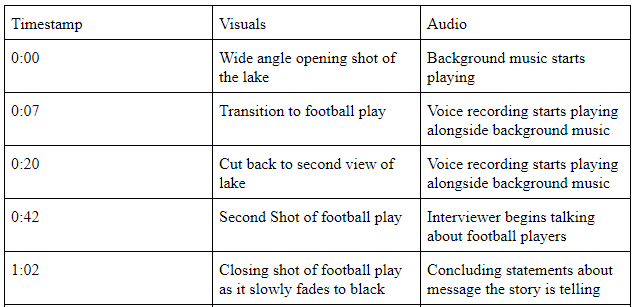
Final Story Project

For my final project I decided to improve my initial draft based on my classmates feedback and also my personal critiques. I really enjoyed the way my draft turned out so I felt too many revisions would disrupt the theme of the video and the message I was trying to send. My influences for the video were based on NFL videos that show the entirety of an athlete’s career and the athlete gets to share their personal take on it. I have grown up watching these kind of videos and they had always inspired me so I felt it appropriate to make one of my own.

The significance of the two different scenes I placed within the video each have their own meaning that tie the video together. The video of the lake is to add a dramatic effect that makes the video feel more personal. The football clips are real clips of me playing and I felt they were necessary to help drive home the message I was talking about. My design process consisted of making sure all the clips were cut exactly the length of my preference and to make sure they matched the audio that was going on in the background. Then I added transitions between the clips to help with the continuity of the story. I made sure the transitions were gradual and slow to make sure the viewer can keep track of what scene is being playing.

Finding the clips themselves was relatively easy because I own the rights to the film of me playing football. For the lake shot I knew I wanted to add a scenic clip so the shot of the lake tied perfectly into my video. I enjoyed using Adobe Premiere more than any of the other programs because I feel it has the room for the most potential alongside with Photoshop. My project turned out the way I hoped it would and I felt as if the message I had in mind was clear. 

Video Story Draft

For my video story draft I wanted to make it have a sentimental feel as well as show football clips. It was difficult to make an original video for this project because of the topic I chose. I knew that I wanted to use real clips from me playing in the past, but taking the video of the lake was the best I could get to match the sentimental feel. I had a great time editing this video as I have always loved to edit videos in the past. I intentionally cut between football clips and the shot of the lake and had them alternate for the most part. I also added a small transition that wasn’t overbearing, but also didn’t create confusion for the viewer. The video editing portion of this class was by far the most fun I have had using adobe software mainly because I am the most familiar with premiere as opposed to the others. The cut tool was important to my project because I had two long videos I had to split up into smaller clips to make them go together. I had always wished I had better clips of me playing football for example a clip from the sideline in better quality would have been a great addition to my project, but unfortunately I don’t have any clips like that. I also used the photo I made for my photoshop final because I really liked how that photo turned out and I felt it added to the story. All of these clips I have complete ownership of and I took the video of the lake myself. I had a difficult time learning to use the transition page and apply them evenly to every clip, but once I figured that out I had an easy time with the rest of the editing process.      

Audio Story Final

For my final draft the main thing I changed was adding some background music to help intensity of the story. I tried to record a new story entirely with similar words, but I liked the way my draft sounded so I decided to keep it. I felt as if the tone of voice used help set the seriousness of the message I was trying to convey and I usually struggle with trying to sound serious. I was also going to add some more dramatic noises such as a crowd cheering, but couldn’t find a way to incorporate it into the story while still making sense. Since my story is not the happiest I chose my music to be rather soft and on the sad side because it’s about the mistakes I made. I also didn’t want to add too much else to the story because I felt it might distract from the message I was trying to get across considering the project had a time limit I wanted to make sure it was clear and concise. When I added the music I made sure to turn it down to really low volume so it didn’t take over from my voice. Personally I get bothered when background music or beats in songs are louder than the lyrics and think it ruins a good piece of work. I really enjoyed this part of the class because I was able to make sense of all the work I did with photoshop and illustrator and also open up about something I don’t normally talk about with people. I have always been sort of embarrassed about how football turned out for me and the poor decisions I made in the past. I am now going to try to play next year at Washington State and hope it all works out in the end. 

Audio Draft

For my story I really wanted to be able to tell my message within the given time frame. I could have gone on and on, but I think the time limit actually helped me keep my story nice and short. Being able to drive home an important message within 2 minutes is a challenge, but since the message itself wasn’t complex it was rather easy. For my design process I was able to ask one of the local highschool football coaches a question about what he sees on a daily basis regarding his athletes. This was the best part of my story because I was able to use someone who sees it happen to kids every year and knows the full extent of my story. I used google docs to write down my script as to what I was going to say during my story. Finding the right parts of the story to tell was difficult because I had to keep it short in order to meet the time requirements. I keep my history in sports short because I felt it wasn’t too important to what the overall theme of the story was. It took me 6-7 takes to record the story without errors. I didn’t think I would get nervous talking into a microphone to nobody, but I struggled with pronouncing my words and my pace. For the first few takes my voice was shaky and I had cottonmouth. After awhile my nerves calmed down and I recorded a draft without errors. What I like about audition over other programs is that you can easily edit the length of the audio with the sliding tool. With other programs such as audacity I struggled with the interface and ended up just getting frustrated. I really enjoyed doing this part of the project as I was able to make sense of all the images I made with photoshop and illustrator.

Final Logo Draft

The final image turned out to look much better than the initial draft. The comments from the peer review helped out a ton and created a whole new inspiration for me. I was able to apply some of the ideas and suggestions given to me from those comments and it made my final draft that much better. For my project I decided to drop the cartoon look on the laces that I had in the first draft, but instead used something else. The text from the draft didn’t complement the photo well and were just kind of thrown on there. On the final draft I was able to incorporate my name into the photo which added another level that I was able to work with. I used the oval tool this time instead of using the square tool and try to concave it inwards to look like a football. The oval tool helped me create a more defined football that had a more realistic look to it. I also learned how to bend straight lines which helped with the development of the white stripes on both ends of the football. This was something that I lacked in the first draft, but after watching some videos I was able to apply it to my logo. For my logo I wanted to include my name, but not in an intrusive matter so I placed it underneath the laces on the football. I think this turned out to look nice because it matched the real look of a football and didn’t change the shape. I was also able to take my first name “Ryan” and bend it around the top curve of the football so it doesn’t look like it stands out too much. I really enjoyed learning how to use Adobe Illustrator and think I will be able to use this app outside of school to enjoy being creative.